
Did you know MySQL has a flag designed to prevent accidentally changing more data than you intended? If not, I think you’ll find it easy to remember as the flag has a memorable name: ‘i-am-a-dummy.’ If you have this flag set and leave off a WHERE clause when updating or deleting data, MySQL will prevent the statement from executing.
Let’s walk through an example using i-am-a-dummy and its “Safe Updates” Workbench counterpart.
What does it do?
I’m going to log into my local MySQL instance and include the –i-am-a-dummy flag:

I’ll navigate to a test database and see what I have in my person table:
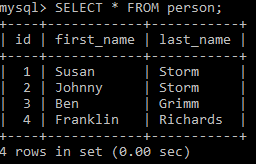
By sheer coincidence, I just finished reading some Fantastic Four and their names happen to be in the person table. I think I’d like to shorten “Susan” to “Sue” for the first record. Let’s update that name:

We get an error:
Error Code: 1175 (HY000): You are using safe update mode and you tried to update a table without a WHERE that uses a KEY column.
I made a dummy move that could have doomed me. I left off my WHERE clause. Had I not set the i-am-a-dummy flag, all of the first_name values in the table would have been set to “Sue” instead of the first record only.
We’ll try updating again and include the WHERE clause:

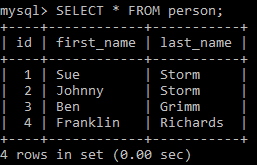
The UPDATE completed successfully, and we can confirm the change:
Safe Updates in Workbench
Let’s compare the i-am-a-dummy flag with the Safe Updates option within Workbench.
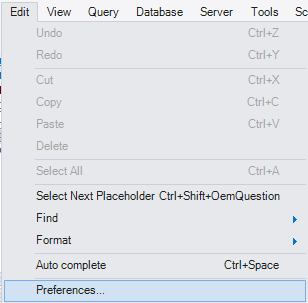
From Workbench, we can go to Edit > Preferences:
With SQL Editor selected, we can look at the bottom of our options and see a check box for Safe Updates:
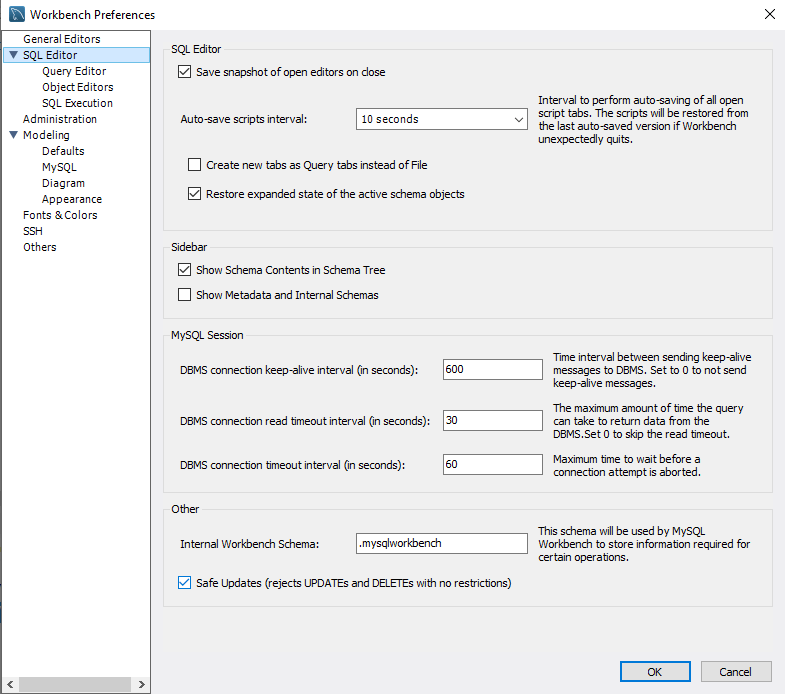
If Safe Updates is turned on and we try to run the UPDATE or DELETE without the WHERE, we’ll see the same type of error message:

Play it Safe
If you’re having trust issues with yourself or want an extra safety net, now you know some of the options shown above that can add some protection.
Thanks for reading!
 Chad Callihan
One thought on “MySQL i-am-a-dummy Flag”