
Migrating databases to new servers and configuring them for availability groups can be a complex process. It can be more complex depending on what type of sneaky features are in use by the databases being migrated. I encountered an interesting issue migrating a database that had been setup to use FILESTREAM and wanted to show the steps I took to identify and resolve it.
Problem Child
All databases for this particular server were successfully migrated and added to the availability group…except for one. There’s always one, isn’t there? For this database, despite SQL Server reporting success when being added to the availability group by selecting “Automatic seeding” for the initial data sync, it was not showing up on the secondary server.

There were no signs of the database in SQL Server Management Studio, and no data files showed up anywhere on the secondary server when checking data drives.
Getting Closer
Considering the “Automatic seeding” method wasn’t getting the job done, I attempted the next option on the list, which is to use a full database and log backup for the initial data sync. This didn’t solve my problem, but it pointed me in the right direction. This time, I received this type of error message indicating that the database could not be restored because the “FILESTREAM feature is disabled” on the secondary server.
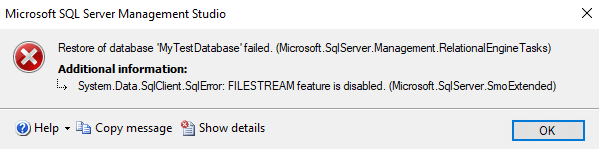
While I was glad to have my answer, I wish the Automatic seeding could have clarified that instead of reporting success. Perhaps it was also logging failure somewhere, and I just hadn’t dug deep enough, but even then that would be misleading. I need to go back and check that sometime.
After enabling FILESTREAM on the secondary server, I tried once again to add the database to the availability group. The process reported that it completed successfully, and the database appeared as expected.
Thanks for reading!
 Chad Callihan
2 thoughts on “Struggles Adding FILESTREAM Database to Availability Group”