
If you haven’t experimented much with SQL Server 2022, you may not be familiar with the new DATE_BUCKET and DATETRUNC functions. Both of these functions are useful when it comes to aggregating data. Let’s take a look at each function and walk through a few examples.
DATE_BUCKET
We’ll start with DATE_BUCKET. DATE_BUCKET gives you the ability to aggregate data based off an interval of your choosing. Imagine we have this set of events:
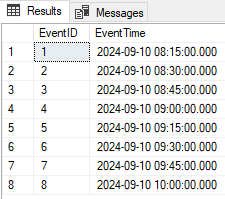
What if we want to see how many events occurred per hour? We can run the following to add an extra column with the bucket each event would fall into:
SELECT EventID, EventTime, DATE_BUCKET(HOUR, 1, EventTime) AS HourBucket
FROM TestData;
GO
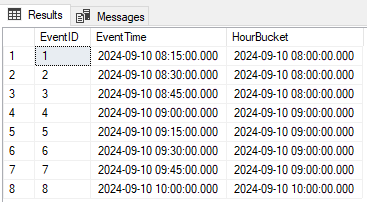
And if we wanted to see a cleaner set of results of just the counts per hour, we could run this:
SELECT COUNT(*) AS 'EventCount', DATE_BUCKET(HOUR, 1, EventTime) AS HourBucket
FROM TestData
GROUP BY DATE_BUCKET(HOUR, 1, EventTime);
GO
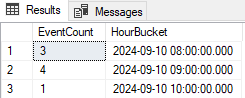
What if we want to group by something besides the hour? Let’s keep it simple and try grouping by day. We can adjust our query for that by replacing HOUR with DAY and running:
SELECT EventID, EventTime, DATE_BUCKET(DAY, 1, EventTime) AS DayBucket
FROM TestData;
GO
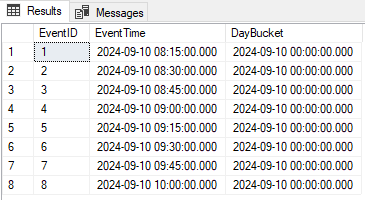
Since these events are all on the same day, we’ll only have a single bucket.
What makes DATE_BUCKET unique is the number parameter. Above, we specified a 1 in DATE_BUCKET(HOUR, 1, EventTime) and DATE_BUCKET(DAY, 1, EventTime). Let’s change up our hour bucket. What if we want each bucket to contain 2 hours of data instead of only 1? We can specify 2 instead of 1 like this:
SELECT EventID, EventTime, DATE_BUCKET(HOUR, 2, EventTime) AS HourBucket
FROM TestData;
GO
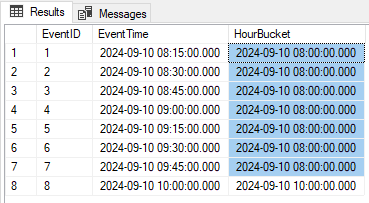
Now we only have two buckets, one for 8-10 and one for 10-12.
DATETRUNC
Now let’s see how DATETRUNC can be applied to the same data. We don’t specify a number in the function like we do with DATE_BUCKET; we only specify the datepart and the date column. Let’s truncate by hour:
SELECT EventID, EventTime, DATETRUNC(HOUR, EventTime) AS TruncatedTime
FROM TestData;
GO
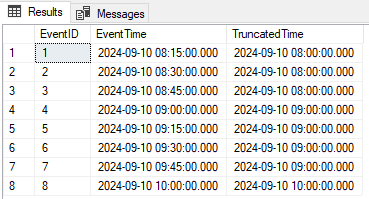
And if we want to see counts per hour:
SELECT COUNT(*) AS 'EventCount', DATETRUNC(HOUR, EventTime) AS TruncatedTime
FROM TestData
GROUP BY DATETRUNC(HOUR, EventTime);
GO
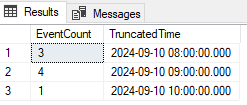
If we change our query to truncate to day instead of hour, we’ll see one bucket for 2024-09-10:
SELECT EventID, EventTime, DATETRUNC(DAY, EventTime) AS TruncatedTime
FROM TestData;
GO
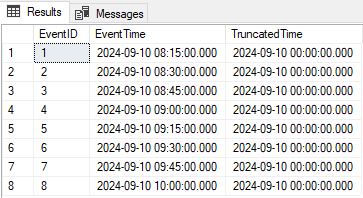
Which When
As far as what function to use when, try DATE_BUCKET when you’re working with specific time intervals and DATETRUNC when you just need to truncate dates to aggregate data.
Thanks for reading!
 Chad Callihan