
The MySQL keyring plugin is a built-in plugin that can be used for encrypting data at rest and protecting sensitive information. Let’s step through an example demonstrating what’s visible in a file before and after encrypting data with the keyring plugin.
Open for Business
Using the sakila sample MySQL database, let’s focus on the actor table. If we select from the table, we’ll see the following:
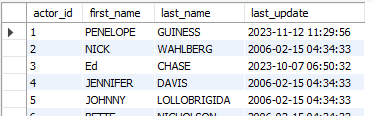
For this example, we’ll focus on the first record for Penelope Guiness. If we navigate to the actor.ibd data file on the MySQL server and open it up in a program like Notepad++, what do you think we’ll see? Upon opening the file, there’s nothing of value that immediately stands out:

But if we do a search for Penelope, we can find her information and information for other records in the actor table:

Enabling keyring
Let’s enable the keyring plugin and encrypt the actor table. First, we’ll want to add the following under the mysqld section of our my.ini file. This will make sure to load the plugin and specify the location when MySQL starts:
early-plugin-load=keyring_file.dll
keyring_file_data=keyring_data

Now, let’s restart our MySQL service and verify that the plugin is active by running:
SELECT *
FROM information_schema.plugins
WHERE plugin_name LIKE 'keyring%';

PLUGIN_STATUS shows as ACTIVE. That looks good. We’re ready to encrypt the actor table. We’ll do that by running:
ALTER TABLE sakila.actor ENCRYPTION = 'Y';
To confirm our table is encrypted, we can run the following query:
SELECT TABLE_NAME, CREATE_OPTIONS
FROM information_schema.tables
WHERE TABLE_SCHEMA = 'sakila' AND TABLE_NAME = 'actor';
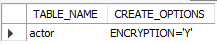
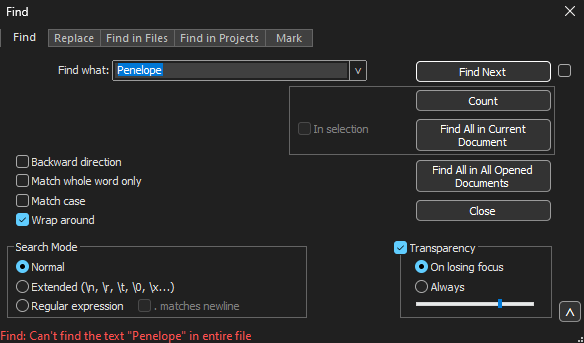
If we go back to our actor.ibd file, open it, and search for Penelope, we’ll no longer be able to find a match.
Don’t Forget to Backup the keyring_file
Keep in mind that you’ll want to have a backup of the keyring data file. If that file is lost, your data will be lost. In the example above, the keyring_file was in my MySQL Server 8.0\Data path. If I remove that file, restart MySQL, and try to select from the actor table, I get this message:
Error Code: 3185. Can’t find master key from keyring, please check in the server log if a keyring is loaded and initialized successfully.
Moving the keyring_file back into the MySQL Server 8.0\Data path and restarting MySQL allows me to once again view the actor table.
Key to Success?
As the example above shows, the MySQL keyring plugin is a quick way to add an extra layer of protection for your data. If you’re considering encryption options, keep the MySQL keyring plugin in mind.
Thanks for reading!
 Chad Callihan