

February’s T-SQL Tuesday invite comes from Steve Jones. Steve asks us to write about experiences with database permissions. To read the full invite, click the T-SQL Tuesday logo.
I can’t remember where I heard the analogy, but think of a SQL Server Login as the key to a hotel. While a Login will get you in the hotel, you need a room-specific key (User) to access specific rooms (or databases) in that hotel.
When it comes to creating new logins and users, dbatools can help make it a more manageable process. This is especially helpful when you’re deploying the same login and/or user to multiple servers at a time.
Here are a few dbatools functions that I’ve used.
Adding a Login with New-DbaLogin
How can dbatools make it easier? Let’s start by creating a SQL Server Login with New-DbaLogin.
One way to create a basic TSQL2sday login to a server called CALLIHAN\MSSQLSERVER02 would be to run something like this:
New-DbaLogin -SqlInstance CALLIHAN\MSSQLSERVER02 -Login TSQL2sday
This will prompt you to enter a password for the login:

If you’re being extra vigilant, you might notice that the password I used in the example was only four characters long, meaning it’s not the most secure. We can add a couple of changes to our script to help with password security: -PasswordPolicyEnforced to enforce password policies and -PasswordExpirationEnabled to enforce password rotation:
New-DbaLogin -SqlInstance CALLIHAN\MSSQLSERVER02 -Login TSQL2sday -PasswordPolicyEnforced -PasswordExpirationEnabled
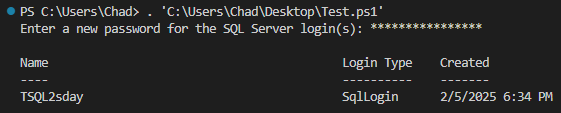
That’s a bit better.
Depending on your situation, it may be worth adding the -PasswordMustChange switch, which will force the password to change at the next login.
Also, for this example, I only added to one server. To save having to repeat this on multiple servers, I can make my server list a comma-separated list and deploy to all servers at once:
New-DbaLogin -SqlInstance SQL01,SQL02,SQL03,SQL04 -Login TSQL2sday -PasswordPolicyEnforced -PasswordExpirationEnabled
Adding a User with New-DbaDbUser
Now that we’ve unlocked the house with a login, let’s create a User with New-DbaDbUser to get into a room.
For a barebones user add for TSQL2sday to the ChadTest database referencing the TSQL2sday Login, we can run:
New-DbaDbUser -SqlInstance CALLIHAN\MSSQLSERVER02 -Database ChadTest -Login TSQL2sday

Like with New-DbaLogin, we can adjust to add a user to multiple servers or databases.
Better Late Than Never
These are a few examples of using New-DbaLogin and New-DbaDbUser to manage credentials. With various switches available, it’s worthwhile to explore how they can fit your workflow.
Thanks for reading!
Note: Apologies for the T-SQL Tuesday post coming on a Wednesday. I had intended on finishing and posting yesterday but COVID had other plans.
 Chad Callihan
One thought on “T-SQL Tuesday #183 – Tracking Permissions”