
Do you know who is logging into your SQL Server?
I was once asked about the need to track SQL Server logins. Many servers were already tracking failed logins. Where the issue came up in this case was tracking successful logins to determine login usage. Let’s take a quick look at how we can track both failed and successful logins.
Configuring Login Auditing in SSMS
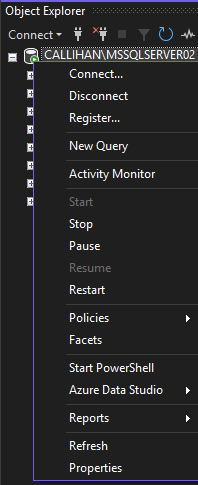
Let’s log into our SQL Server with SSMS. We’ll right-click on our server in Object Explorer and select Properties.
In Server Properties, we’ll check the Security page and review the Login auditing settings.

In the example above, we’re already auditing failed logins only. This is beneficial as it allows you to track suspicious logins. We have three other options: None, Successful logins only, and Both failed and successful logins.
I wouldn’t recommend changing login auditing to None. Disabling login auditing altogether is not best practice and is going to put you in a tough spot if you ever need these logs.
Successful logins only could be useful to track expected logins and have some limited auditing capabilities. But tracking successful logins can quickly take up a lot of space in logs, and with this setting you’re not checking for failed logins, which is arguably much more important.
That leaves us with Both failed and successful logins. This choice can be nice to have, but as mentioned above, logging all successful logins will clutter your error log. This can make it more difficult to sift through when you need to find something important.
For testing purposes, we’ll choose the last option, Both failed and successful logins and click OK to save our settings.
Viewing Audit Log Entries
If I try to log in with the wrong password and then log in successfully with the correct password, I should see both attempts logged. Checking server logs proves that we’re logging both failed and successful logins:

Conclusion
The type of login auditing you configure is up to your security requirements. Tracking failed logins is always beneficial when monitoring for attacks. Tracking successful logins can also be beneficial but isn’t something I’d typically have enabled due to the potential for large logs. Still, it’s nice to have the option and know it’s there if needed.
Thanks for reading!
 Chad Callihan
One thought on “SQL Server Login Auditing Options”