
When learning T-SQL, I’d wager that learning GROUP BY comes up early in the process. What may not be mentioned are the variations that can be added to a GROUP BY clause. Are you familiar with GROUP BY GROUPING SETS, GROUP BY ROLLUP, and GROUP BY CUBE? If you’ve never seen these used, or if you have and want a refresher, read on as we look at an example of each.
First, let’s start out with some comic book sales test data:
CREATE TABLE ComicSales (
    Id          INT IDENTITY(1,1) PRIMARY KEY,
    Publisher   VARCHAR(50),
    Series      VARCHAR(50),
    IssueYear   INT,
    CopiesSold  INT
);

INSERT INTO ComicSales (Publisher, Series, IssueYear, CopiesSold) VALUES
('Marvel',   'Spider-Man',   2023, 50000),
('Marvel',   'Spider-Man',   2024, 42000),
('Marvel',   'X-Men',        2023, 38000),
('Marvel',   'X-Men',        2024, 40000),
('DC',       'Batman',       2023, 60000),
('DC',       'Batman',       2024, 55000),
('DC',       'Superman',     2023, 30000),
('DC',       'Superman',     2024, 28000),
('Image',    'Spawn',        2023, 20000),
('Image',    'Spawn',        2024, 22000);
GROUP BY GROUPING SETS
What if we want to write a query to show the number of copies sold for each publisher and series, the total for the publisher, and the overall sales for all publishers? A single GROUP BY can only return one grouping level at a time. Instead, we can use GROUPING SETS to accomplish our goal with this query:
SELECT Publisher, Series, SUM(CopiesSold) AS TotalCopies
FROM ComicSales
GROUP BY GROUPING SETS (
    (Publisher, Series),
    (Publisher),
    ()
);
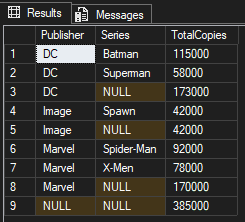
For our GROUPING SETS query, we’re specifying the combination of groupings we want. We’re focusing on Publisher and Series, Publisher, and a Total, which is represented by (). Looking at Batman in the first row, TotalCopies is 115000. This makes sense because our test data had 60000 in 2023 and 55000 in 2024.
For the third row, we see NULL for Series because that row represents a total for DC as a publisher. We see 173000 in TotalCopies, which is based on the TotalCopies of Batman and Superman in the first two rows.
Notice the same Publisher and Series grouping for Image and Marvel. The last row of the results has TotalCopies for all publishers combined.
GROUP BY ROLLUP
We can get the same results as above by using ROLLUP. GROUP BY ROLLUP automatically creates subtotals that are based on the left-to-right hierarchy of columns specified while also including a grand total of the records returned.
SELECT Publisher, Series, SUM(CopiesSold) AS TotalCopies
FROM ComicSales
GROUP BY ROLLUP (Publisher, Series);
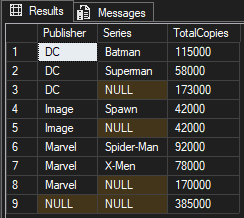
If you’re wanting results that are non-hierarchical, go with GROUPING SETS.
GROUP BY CUBE
What if we wanted to show all possible combinations in our result? We can use CUBE to accomplish that. Let’s include IssueYear and run the following query:
SELECT Publisher, Series, IssueYear, SUM(CopiesSold) AS TotalCopies
FROM ComicSales
GROUP BY CUBE (Publisher, Series, IssueYear);

That’s a lot to take in. Let’s narrow our results and only look at Batman.
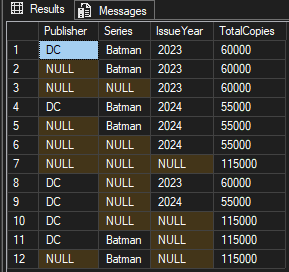
We have all of the combinations possible amongst Publisher, Series, IssueYear, and a grand total.
Group Effort
The next time you’re faced with a need to group data, remember to consider the additional options above.
Thanks for reading!
 Chad Callihan