
QUOTENAME can be used to make sure database objects are valid in your query. Most of the time, objects like table names only contain valid characters, so there’s nothing to worry about. But nobody’s perfect. Let’s look at an example of what can happen when somebody creates a table with a forward slash in the name and see how QUOTENAME can be used to query against it.
And I Quote
Let’s say we’re reviewing a query that takes in a table name before retrieving rows. One of those tables is called Message/Error. If we run the following, will we get results or an error?
DECLARE @SQL NVARCHAR(200);
DECLARE @Table sysname = 'Message/Error';

SET @SQL = N'SELECT * FROM ' + @Table;

EXEC sp_executesql @SQL;
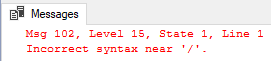
No luck. We’re trying to plug in the Message/Error but the forward slash is causing us some trouble. That’s where QUOTENAME can come in handy. Let’s rewrite @SQL and use QUOTENAME with the @Table variable:
DECLARE @SQL NVARCHAR(200);
DECLARE @Table sysname = 'Message/Error';

SET @SQL = N'SELECT * FROM ' + QUOTENAME(@Table);

EXEC sp_executesql @SQL;
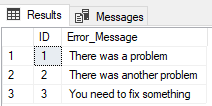
Small Change Big Difference
So what’s the difference? If we compare what we set @SQL to in the first try with what we set it to in the second try:
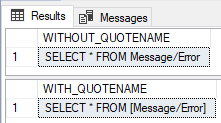
We see brackets around our table name, and those brackets make the difference.
More Options
Brackets are used by default, but you can also specify alternative characters if you wish. You can use QUOTENAME to include single quotes, brackets, quotation marks, parenthesis, greater than or less than signs, braces, or a backtick.
If we wanted to use braces instead of brackets, we could run:
SELECT QUOTENAME('My Text', '{') AS 'BRACES_EXAMPLE';
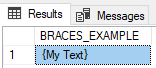
If you use a character that is not acceptable, you’ll get a NULL result. We can see this if we try using a dollar sign:
SELECT QUOTENAME('My Text', '$') AS 'NULL_EXAMPLE';

If you run into troublesome objects or just have a need for a delimiter around a string, QUOTENAME is your answer.
Thanks for reading!
 Chad Callihan
One thought on “Why Use QUOTENAME?”