
SQL Server has the CHARINDEX() and PATINDEX() functions that can both be used to find the position of a value in a string. They each have some differences that make them unique and more fitting for specific situations.
Let’s look at a few examples of how each can be used.
Number 1 Guy
Let’s say we have the string “Michael Keaton is the number 1 Batman.”
If we want to find the position of Batman in this string, we can use CHARINDEX():
DECLARE @BatmanString VARCHAR(50) = 'Michael Keaton is the number 1 Batman.';
SELECT CHARINDEX('Batman', @BatmanString) AS BatmanCharPos;

We see that the position is 32.
We could also use PATINDEX() to find this:
DECLARE @BatmanString VARCHAR(50) = 'Michael Keaton is the number 1 Batman.';
SELECT PATINDEX('%Batman%', @BatmanString) AS BatmanPatPos;

Just as with CHARINDEX(), we see position 32. Nothing too crazy there.
Wildcard
But what if we wanted to find out if there was a numerical value in the string? We don’t want to just search for the character “1” because maybe somebody has a different ranking for their Batman. Maybe instead of number 1 it could be number 2, 3, etc. We can try to do this search with CHARINDEX() and searching [0-9] but it won’t work. We won’t get an error message, but we won’t get a correct result either.
DECLARE @BatmanString VARCHAR(50) = 'Michael Keaton is the number 1 Batman.';
SELECT CHARINDEX('%[0-9]%', @BatmanString) AS BatmanCharPos;

While we can’t get a correct result using CHARINDEX(), we can get a correct result using PATINDEX():
DECLARE @BatmanString VARCHAR(50) = 'Michael Keaton is the number 1 Batman.';
SELECT PATINDEX('%[0-9]%', @BatmanString) AS PositionOfNumber;

Sticking with PATINDEX() and the ability to search wildcards, maybe we’re not sure if we’re looking for Batman, Superman, etc. With PATINDEX() we can just search for “man” and find a position.
DECLARE @BatmanString VARCHAR(50) = 'Michael Keaton is the number 1 Batman.';
SELECT PATINDEX('%man%', @BatmanString) AS PositionOfMan;

Where to Start
CHARINDEX() also gives you the option to choose a starting point for the search of a string. Let’s change up our string while still searching for the position of Batman:
DECLARE @BatmanString VARCHAR(50) = 'The best Batman is a Michael Keaton Batman.';
SELECT CHARINDEX('Batman', @BatmanString) AS BatmanCharPos;
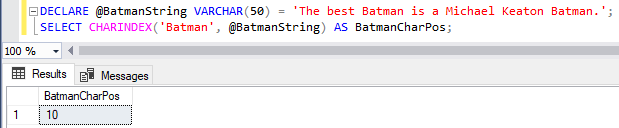
We see that the position of the first Batman in the string is 10. What if we’re looking for a second instance of Batman? We can add the starting position after the string we’re searching when using CHARINDEX(). Since we know the first instance is at character 10 based on our previous query, let’s search again starting at character 11:
DECLARE @BatmanString VARCHAR(50) = 'The best Batman is a Michael Keaton Batman.';
SELECT CHARINDEX('Batman', @BatmanString, 11) AS BatmanCharPos;

Now we get the position of the second instance of Batman at position 37.
Find It
For an average position search, CHARINDEX() and PATINDEX() can both accomplish the task. In addition, PATINDEX() is what to use if you need to search with wildcards, and CHARINDEX() has the benefit of choosing a starting point in the string for your search.
Thanks for reading!
 Chad Callihan
One thought on “Finding Positions with CHARINDEX() and PATINDEX()”