
Have you ever come across a feature or function and thought, “That’s great…but why?” The SIGN function in SQL Server is a function that may appear to fit that mold at first, but I don’t believe that to be the case. While uncommon in my experience, it can be valuable. Let’s take a look at a use case.
Defining SIGN
If you’re not familiar with the SIGN function, fear not, you’re not alone. I’ve rarely seen it mentioned and even more rarely seen it in use. The SIGN function can be used to return the positive, zero, or negative sign of a specified expression. The topic came up recently, and the question was asked, “What’s a real-world example?” so I thought I’d put together this blog post.
CASE by CASE
For our example, we’ll imagine we have a comic book collection that we want to track. We want to query our data to find what comic books in our collection are gaining in value, staying the same value, and losing value. Let’s create a table and insert a small but mighty collection (with a little help from Claude for this script, so prices may not be accurate):
CREATE TABLE comic_collection ( issue_id INT PRIMARY KEY, comic_title VARCHAR(100), issue_number INT, purchase_price DECIMAL(10,2), current_market_value DECIMAL(10,2));INSERT INTO comic_collection (issue_id, comic_title, issue_number, purchase_price, current_market_value) VALUES(1, 'Amazing Fantasy', 15, 2500.00, 8500.00),(2, 'Youngblood', 1, 20.00, 2.00),(3, 'X-Men', 1, 15.00, 15.00),(4, 'Incredible Hulk', 181, 1200.00, 4200.00),(5, 'Superman (Vol 2)', 75, 10.00, 3.00),(6, 'Batman', 497, 5.00, 5.00);
To find our comics gaining, flat, and losing value without using the SIGN function, what do we do? One option would be to use CASE statements. We could run this:
SELECT CASE WHEN (current_market_value - purchase_price) > 0 THEN 1 WHEN (current_market_value - purchase_price) < 0 THEN -1 ELSE 0 END AS performance_code, CASE WHEN (current_market_value - purchase_price) > 0 THEN 'Key Issue Gain' WHEN (current_market_value - purchase_price) < 0 THEN 'Value Loss' ELSE 'Broke Even' END AS market_label, COUNT(*) AS issue_countFROM comic_collectionGROUP BY CASE WHEN (current_market_value - purchase_price) > 0 THEN 1 WHEN (current_market_value - purchase_price) < 0 THEN -1 ELSE 0 END, CASE WHEN (current_market_value - purchase_price) > 0 THEN 'Key Issue Gain' WHEN (current_market_value - purchase_price) < 0 THEN 'Value Loss' ELSE 'Broke Even' END;
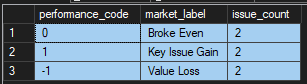
We see two issues for each label. This query accomplishes our goal but looks a bit wordy.
Implementing SIGN
We can use the SIGN function to simplify the query and get the same data:
SELECT SIGN(current_market_value - purchase_price) AS performance_code, CASE SIGN(current_market_value - purchase_price) WHEN 1 THEN 'Key Issue Gain' WHEN 0 THEN 'Broke Even' WHEN -1 THEN 'Value Loss' END AS market_label, COUNT(*) AS issue_countFROM comic_collectionGROUP BY SIGN(current_market_value - purchase_price);
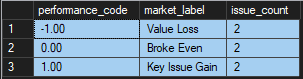
One small note, our performance_code value here is a decimal due to the type of values the SIGN function receives.
We could also use SIGN to find net gains minus losses with a script like this:
SELECT SUM(SIGN(current_market_value - purchase_price)) AS net_moversFROM comic_collection;

Each comic gaining in value gets a plus 1, each loser minus 1, and breaking even is 0. Since we have two of each time in the sample data, the query returns 0.
Signing Off
Now you can say you’re familiar with the SIGN function. You may not see it too often in the wild, but if it ever pops up during SQL Server trivia night, you’ll be a winner.
Thanks for reading!

