
The T-SQL Tuesday invite for this month comes from Steve Jones, who invites us to write about what’s new with SQL Server 2025 that will make our jobs easier. Click the T-SQL Tuesday logo to read the full invite.
I had written most of this blog post before seeing this month’s T-SQL Tuesday invite. I decided to hold off a few days to post because, while it’s no secret, I think it’s worth pointing out to those that may not know: before you spend time testing SQL Server 2025, make sure you consider what version of Developer Edition to use.
You may read that and ask, “What do you mean? Isn’t there only one Developer Edition?” That used to be the case, but not anymore.
When it came to testing a new version of SQL Server, you used to only have the option of using Developer Edition. Microsoft included all the bells and whistles of Enterprise Edition with the intent to test out features and plan a potential upgrade. And of course, to try luring you to upgrade to Enterprise Edition to get all of the latest and greatest available features.
Developer Edition was great for organizations using Enterprise Edition in production, but what about those companies that aren’t utilizing Enterprise Edition? What happens when a company on Standard Edition wants to test out how a new version of SQL Server will perform for them in production?
A developer might test a shiny new feature and plan to use it after upgrading…only to discover it isn’t available in their Standard Edition of SQL Server. It happens.
Imagine you’re test driving cars and fall in love with a car featuring automatic cruise control. You sit down with the salesman to buy that car, but they accidentally swap it out with one not including that feature. If you take your new car on the interstate for the first time not realizing it’s missing automatic cruise control, you’ll be in for a surprise when you hit the highway.
From a database standpoint, SQL Server 2025 solves this issue with the inclusion of a SQL Server 2025 Enterprise Developer Edition and a new SQL Server 2025 Standard Developer Edition.
Download the SQL Server 2025 Preview executable here. Run the installer, choose your install path, and let it download files for install. Once that completes, you can click a dropdown under “Specify a free edition” and choose “Standard Developer”:
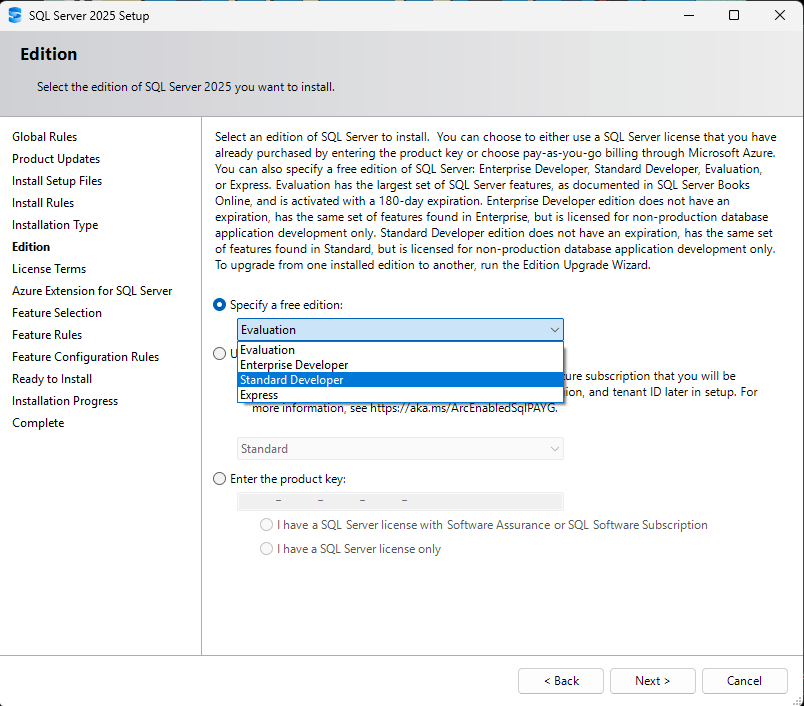
No more testing an Enterprise Edition knowing you’ll be using the Standard Edition in production. There can always be unforeseen issues, but this takes a little bit of guesswork out of the process. If you’re on Standard Edition in production, you can finally test in an environment to match it.
Thanks for reading!


3 thoughts on “T-SQL Tuesday #192 – Benefits of Two SQL Server 2025 Developer Editions”