
It’s been far too long since I did a blog post with some code examples, so let’s break that cold streak.
Let’s talk about RegEx finally making its way to SQL Server 2025. RegEx provides a way to perform more advanced pattern matching with queries, and most would argue it was an overdue feature in SQL Server. Let’s take a look at REGEXP_LIKE, REGEXP_SUBSTR, and REGEXP_REPLACE.
REGEXP_LIKE
We’ll start with REGEXP_LIKE. This comes in handy when we want to know if a value matches the pattern we desire. What if we want to make sure our comic publisher email addresses are all valid? For our test data, we have two that are correct and two that are incorrect:
CREATE TABLE ComicPublisher ( PublisherID INT PRIMARY KEY, PublisherName VARCHAR(100), PublisherEmail VARCHAR(150));INSERT INTO ComicPublisher VALUES(1, 'Marvel Comics', 'info@marvel.com'),(2, 'DC Comics', 'contact@dccomics.com'),(3, 'Image Comics', 'missing@dotcom@image'),(4, 'Dark Horse Comics', 'noemail');
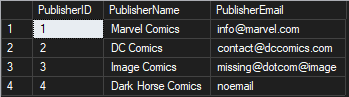
We can use REGEXP_LIKE to find email addresses that fit the name@domain.com pattern:
SELECT PublisherName, PublisherEmailFROM ComicPublisherWHERE REGEXP_LIKE(PublisherEmail, '^[a-zA-Z0-9._%+-]+@[a-zA-Z0-9.-]+\.[a-zA-Z]{2,}$');

And add NOT to see the email addresses that don’t fit the pattern:
SELECT PublisherName, PublisherEmailFROM ComicPublisherWHERE NOT REGEXP_LIKE(PublisherEmail, '^[a-zA-Z0-9._%+-]+@[a-zA-Z0-9.-]+\.[a-zA-Z]{2,}$');

REGEXP_SUBSTR
Next, let’s look at an example of REGEXP_SUBSTR. As the SUBSTR part of the name hints at, REGEXP_SUBSTR will let you extract part of a string that matches a given pattern. Sticking with the email example, let’s say we have records with long strings of text and we want to extract the valid email addresses from them.
CREATE TABLE PublisherContacts ( ContactID INT PRIMARY KEY, ContactNotes VARCHAR(500));INSERT INTO PublisherContacts VALUES(1, 'Reached out to Marvel rep. Contact them at submissions@marvel.com for new artist inquiries.'),(2, 'DC editorial team can be found at talent@dccomics.com — ask for the acquisitions department.'),(3, 'No email on file. Call the Image Comics office directly.'),(4, 'Dark Horse accepts pitches via pitches@darkhorse.com but response time is 6-8 weeks.'),(5, 'Two contacts available: western@idwpublishing.com handles US and we are tracking down the other.'),(6, 'Boom Studios rep said to email boom_editorial@boomstudios.com before sending any physical copies.'),(7, 'This record has no contact information yet. Follow up with sales team.'),(8, 'Left voicemail. Waiting on callback. Possible email is info@@dynamite.com but unconfirmed — invalid format.');
We can run this:
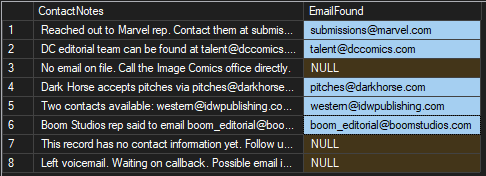
SELECT ContactNotes, REGEXP_SUBSTR(ContactNotes, '[a-zA-Z0-9._%+-]+@[a-zA-Z0-9.-]+\.[a-zA-Z]{2,}') AS EmailFoundFROM PublisherContacts;
If a pattern matching the email address is found, we’ll see a result.
REGEXP_REPLACE
Finally, we’ll check out REGEXP_REPLACE. One use case for REGEXP_REPLACE is getting consistent formatting for phone numbers. To me, phone numbers were always represented like 555-555-5555 but in recent years it’s common to see a phone number written as 555.555.5555 with dots instead of dashes. Others may throw in the parentheses for the area code. For our scenario, let’s take the format entered and clean it up so that it’s numbers only.
Our data might look like this:
CREATE TABLE HeroDirectory ( HeroID INT PRIMARY KEY, HeroName NVARCHAR(100), RawPhone NVARCHAR(50));INSERT INTO HeroDirectory (HeroName, RawPhone)VALUES (1, 'Peter Parker', '718-555-3228'),(2, 'Bruce Wayne', '609.555.0124'),(3, 'Clark Kent', '(217) 555-5252'),(4, 'Tony Stark', '212 555 9999');
To use REGEXP_REPLACE, we can run this and remove all of the characters that aren’t numbers:
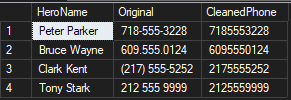
SELECT HeroName, RawPhone AS Original, REGEXP_REPLACE(RawPhone, '[^0-9]', '', 1, 0) AS CleanedPhoneFROM HeroDirectory;
Now all phone numbers have the same format without dashes, periods, or parentheses.
Better Late Than Never
Have you been taking advantage of the new RegEx functions? If not, give them a shot and see how they can help.
Thanks for reading!

