
Code formatting can be a touchy subject. Sometimes there are clear rules to designate right and wrong, and sometimes there’s not. Tabs versus spaces, anyone?
Surprisingly, SQL Server Management Studio has never had a built-in SQL formatter. Users were always left to use third-party tools or format by hand. But with the latest SSMS 22.7, SQL formatting finally comes built-in.
Let’s look at some examples and see how it performs.
Examples Using SQL Formatting
Let’s start off with the basic query below:
select * from sys.databases where create_date > getdate()-30 and state_desc = 'ONLINE'
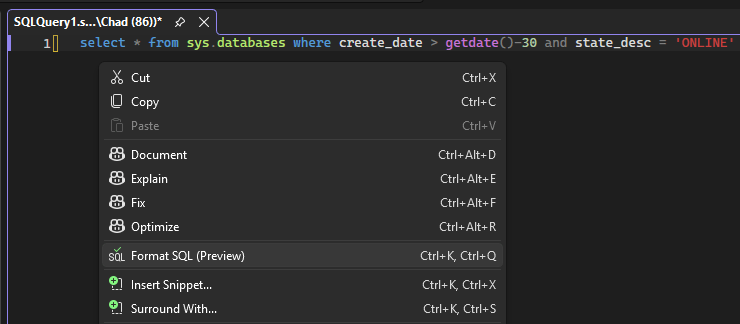
Nothing too crazy. If we want to format that query, we can either right click in the query window and then select Format SQL (Preview):
Or we can click Edit > Advanced > Format SQL (Preview):
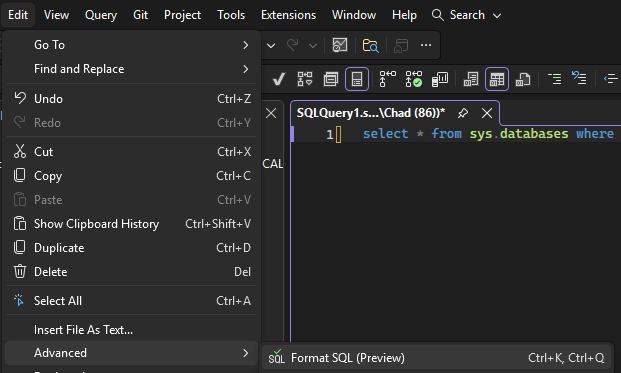
Finally, there’s the option to use the keyboard shortcut (Ctrl+K, Ctrl+Q) noted in the previous screenshot to format SQL.
The result will give us the following:
SELECT *FROM sys.databasesWHERE create_date > getdate() - 30 AND state_desc = 'ONLINE';
That looks good to me. What about something more complicated? I grabbed this query from a previous blog post and didn’t have the same success:
SELECT SUSER_SNAME(owner_sid) AS DBOWNER, d.name AS DATABASENAMEFROM sys.server_principals rINNER JOIN sys.server_role_members m ON r.principal_id = m.role_principal_idINNER JOIN sys.server_principals p ON p.principal_id = m.member_principal_idINNER JOIN sys.databases d ON suser_sname(d.owner_sid) = p.nameWHERE is_trustworthy_on = 1 AND d.name NOT IN ('msdb') AND r.type = 'R' AND r.name = N'sysadmin';GO
I left it as it was and tried formatting to see what the result would be. The result ended up being an error:
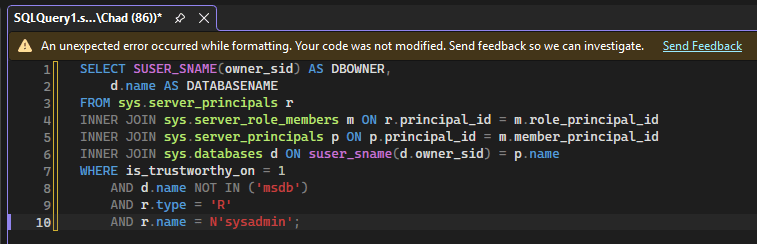
The query runs successfully, so it’s not as if the query were invalid. SQL Formatter is still in preview, so I can’t complain too much.
Could be Better, Could be Worse
It’s nice to have a formatter built into SSMS. I’m not too concerned with the issues I ran into since it’s still in preview. It’s useful to have available now, and I expect it to improve and become more usable in the near future.
Thanks for reading!


2 thoughts on “SQL Formatting in SSMS 22.7”