
Along with the broader term of “AI”, “vector” has also been a hot term, but it may not be as clear what it means. You may have also noticed that with SQL Server 2025, one of the new features introduced is support for vectors. This may span a few blog posts, but I wanted to go through a few examples of vectors and AI in SQL Server 2025.
What Are Vectors?
Vectors consist of an ordered list of numbers that represent characteristics or meaning captured from data. That data could be words, images, or other files. An AI embedding model is used to analyze the data and translate it into a long list of numbers that becomes that data’s vector embedding. The closer the vector embeddings are to each other, the more closely related the meanings of the data are together.
While vectors are more commonly hundreds or thousands of numbers, we’re going to simplify it and make up three numbers for our example.
Comparison Example
So what does that look like in SQL Server? Let’s use vectors to compare peanut butter and jelly (which goes together great) with something awful like peanut butter and…pickles.
We’ll start by using the new VECTOR data type with three values to set our vectors for peanut butter, jelly, and pickles:
DECLARE @peanutButter VECTOR(3) = '[0.90, 0.10, 0.40]';DECLARE @jelly VECTOR(3) = '[0.85, 0.15, 0.45]';DECLARE @pickles VECTOR(3) = '[0.10, 0.85, 0.20]';
To make our comparison, we’ll use the aptly named VECTOR_DISTANCE function to return a distance between our vectors. Along with our vectors, we’ll include the metric to use. We can use cosine, euclidean, or dot. Microsoft’s VECTOR_DISTANCE article includes the table below describing the differences:
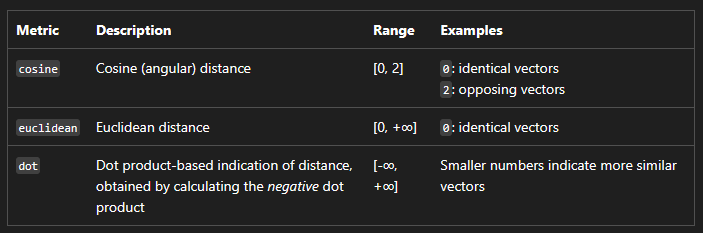
Let’s use the VECTOR_DISTANCE function and cosine to compare peanut butter with jelly and peanut butter with pickles:
DECLARE @peanutButter VECTOR(3) = '[0.90, 0.10, 0.40]';DECLARE @jelly VECTOR(3) = '[0.85, 0.15, 0.45]';DECLARE @pickles VECTOR(3) = '[0.10, 0.85, 0.20]';SELECT VECTOR_DISTANCE('cosine', @peanutButter, @jelly) AS PBAndJelly, VECTOR_DISTANCE('cosine', @peanutButter, @pickles) AS PBAndPickles;
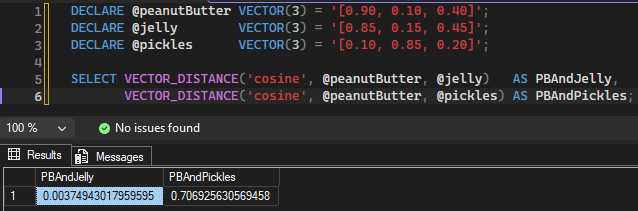
The peanut butter and jelly result is around 0.003, which is close to 0, indicating a similar meaning. For our comparison of peanut butter and pickles, our result can be rounded to 0.707 which is much further from 0, indicating less similarity. As mentioned before, the numbers here are made up, but we’d expect a real embedding model to have similar results with peanut butter and jelly close together, pickles off on their own.
Who’s Hungry?
This is a basic example but hopefully can serve as a nice intro to vectors in SQL Server. Since my vectors were made up, I may take a closer look in a future post at how to get more real-world vectors. And for the sake of all our appetites, I may move on to an example besides peanut butter and pickles.
Thanks for reading!


One thought on “Comparing Data with Vectors in SQL Server 2025”